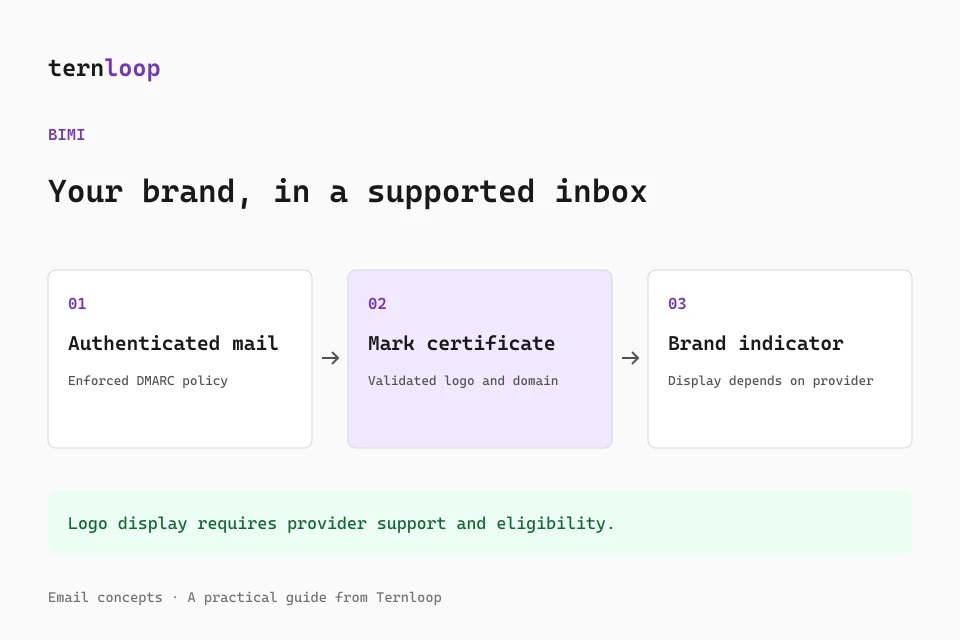
Brand Indicators for Message Identification, or BIMI, provides a way for brands to publish logo information that supporting email clients can associate with authenticated messages. It builds on domain authentication rather than replacing it. A logo in an inbox is the visible result of several technical and administrative checks, not simply an image attached to an email.
For a growing newsletter or product team, BIMI can strengthen brand recognition in participating inboxes. It is not a deliverability shortcut, a universal verification badge, or a guarantee that a message is safe. The sensible order is to establish SPF, DKIM, and DMARC, maintain healthy sending practices, then evaluate whether logo certification and ongoing asset maintenance justify the effort.
Where BIMI fits in email authentication
SPF authorizes servers for an envelope identity. DKIM attaches a domain signature to message content. DMARC checks whether a successful authenticated identity aligns with the visible From domain. BIMI uses that authenticated domain context to support brand logo display according to the recipient provider's rules.
Without a valid authenticated message and appropriate policy, publishing a logo record is insufficient. Even with correct records, a provider may require reputation, eligibility, and certificate checks. The client also needs to support the feature. An image embedded in your signature or campaign header is not a BIMI indicator, though it can still provide branding inside the message.
Think of BIMI as a controlled publishing mechanism for brand assets. Your DNS record and certificate identify which asset belongs with your domain, while the receiving provider decides whether and how to display it.
Start with enforced DMARC, not a cosmetic change
Participating BIMI providers generally require an enforced DMARC policy, using quarantine or reject rather than none. That does not mean you should immediately change a general employee domain to reject solely to obtain a logo. First inventory legitimate sources, confirm alignment, and understand forwarding and mailing list consequences.
As of the Google guidance reviewed for this article, Gmail's BIMI setup instructions specify quarantine or reject and a full policy percentage through pct=100. The new DMARC standard removes the legacy pct tag, while provider documentation and deployed implementations can remain in transition. Follow the current requirements of the mailbox provider and certificate issuer you target, and do not assume percentage based testing satisfies BIMI eligibility.
If your domain cannot safely support the required enforcement, address authentication and operational boundaries first. A dedicated, well governed sending identity may make this work easier, but changing domains also has reputation and recognition implications. Treat the decision as a sending architecture change rather than a logo setting.
VMC and CMC are different certificate paths
Gmail requires a Verified Mark Certificate, or VMC, or a Common Mark Certificate, or CMC, for its supported BIMI display. A VMC typically involves a qualifying registered trademark and validation by an approved issuer. A CMC offers a route for eligible logos that do not meet the VMC trademark path, subject to the issuer's rules.
These are not ordinary website TLS certificates. They validate information about the brand mark and domain according to certificate program requirements. A certificate authority can explain evidence, logo history, jurisdiction, organizational validation, supported domains, and renewal obligations. Do not assume any arbitrary SVG can receive either certificate immediately.
Google distinguishes the visual treatment too: its documented checkmark is associated with a VMC, not automatically every CMC. Other clients may use different presentation or no badge at all. Describe your implementation accurately rather than promising recipients a universal verified icon.
Prepare a conforming logo asset
BIMI logos need the supported SVG profile, commonly called SVG Tiny Portable/Secure, or SVG Tiny PS. A normal SVG exported for your website may contain unsupported features. Scripts, animation, external resources, linked fonts, and interactive elements do not belong in the logo file.
Use vector outlines and a simple self contained design. The relevant profile uses baseProfile="tiny-ps" and version 1.2. Google additionally requires absolute pixel dimensions of at least 96 by 96 and recommends a centered square layout, a solid background, a small file, and accessible description metadata. Verify the exact current profile requirements with the issuer and recipient provider before final submission.
Do not merely rename a PNG file to SVG or change a root attribute while leaving incompatible content inside. Use an appropriate export workflow and a validator that understands the profile. Make sure the graphic remains recognizable at the small size used beside inbox messages, not only on a large design canvas.
Host the asset and certificate reliably
Public BIMI resources need stable HTTPS URLs that recipient systems can fetch without logging in. Avoid expiring storage URLs, private file sharing links, or access rules that require a browser session. The host's TLS certificate and certificate chain should be valid, and the resource should return its intended file rather than an HTML login page.
Your certificate issuer may supply an entity certificate and instructions for building a PEM file with the required intermediate and root chain. Follow the supplied order and publishing requirements. In some supported configurations, the logo is embedded in the PEM asset, so a separate SVG location is not the only possible arrangement.
Keep a clear owner for hosting. A website migration, CDN access rule, expired certificate, or removed file can interrupt logo validation even though the email sending provider remains healthy. Monitor resource availability and renew certificates before expiration rather than waiting for a missing logo report.
Publish the BIMI assertion record
A common lookup name for the default selector is default._bimi.example.com. A conventional illustrative record can look like this:
v=BIMI1; l=https://example.com/brand/logo.svg; a=https://example.com/brand/certificate.pem
These are reserved example addresses, not files you can use for your own identity. The l tag indicates a logo location and the a tag indicates certificate assertion material in configurations that use them. Provider instructions can also describe a certificate with an embedded logo and an empty logo location. Use the record required for your issued assets and target provider.
Check how your DNS dashboard appends the domain name and publish the intended TXT record at the correct selector. Then query it externally, inspect the exact returned value, and test the URLs independently. Do not assume a dashboard success notification proves the record is discoverable by recipients.
Test the message, not only the record
Send a message through your real campaign platform using the intended From domain. Inspect the receiving system's authentication results to confirm DMARC passes with an aligned identifier. Verify that the signing domain, author domain, policy, BIMI selector, certificate, and published logo match the configuration you intend.
Use an actual supported mailbox rather than a browser email preview to check BIMI display. Some providers cache assets and validation results, so the logo may not change immediately after a DNS or file update. Account settings and client editions can also affect what is visible.
Keep several kinds of evidence: DNS responses, certificate validity, asset availability, raw message headers, and a received inbox screenshot. A missing logo without these details does not tell you whether the problem is authentication, eligibility, caching, or client support.
Diagnose missing logos in a useful order
First confirm the recipient client supports the implementation you are testing. Then check whether the actual message passes DMARC, whether the relevant policy meets the provider's enforcement requirements, and whether the assertion record is published for the right domain and selector.
Next validate the logo profile, public HTTPS hosting, certificate chain, certificate dates, and domain coverage. If those checks pass, review the provider's eligibility and reputation requirements and allow for documented caching behavior. Escalate with concrete evidence rather than repeatedly changing the logo record in an attempt to force display.
Do not weaken an established authentication configuration merely because a logo is absent. BIMI is optional presentation on top of authentication. Maintaining legitimate delivery and domain protection takes priority over a cosmetic indicator.
Budget for maintenance and realistic value
The cost is more than the DNS edit. Certificate issuance and renewal can involve fees and organizational validation. Trademark registration, where needed, may require legal work and time. Logo updates can require another certification process rather than a simple asset replacement.
Assess the mailbox mix of your actual audience before investing. If few recipients use supporting clients, the practical benefit may be limited. Even when the logo displays widely, changes in open rates can be affected by privacy protections, sender recognition, content, and campaign timing. Avoid attributing every change to BIMI or promising a specific uplift without controlled evidence.
Keep the message itself useful. A recognizable logo cannot compensate for unexpected campaigns, misleading subjects, or an inaccessible layout. Use the subject line tester, HTML email preview, and signature generator to prepare the content recipients actually read.
Bring the pieces together
Ternloop supports writing, organizing, scheduling, and tracking campaigns in one workspace. Configure your chosen sending identity according to its DNS and provider requirements, and evaluate BIMI as an additional brand project once those foundations are stable.
Read the BIMI Group's guidance, Google's current BIMI setup instructions, and the DMARC guide. Continue with email deliverability to understand why permission, reputation, and feedback still matter after authentication and logo publication succeed.