Email deliverability: a practical guide to reputation, consent, and inbox readiness
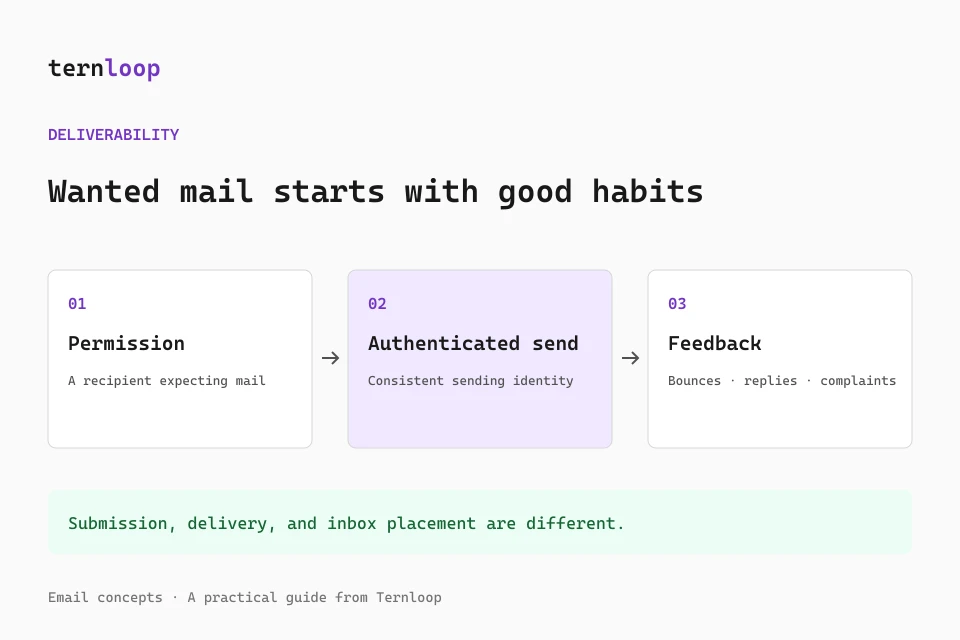
A sending API returning success does not mean a reader saw your campaign. The provider may have accepted the request while the recipient server has not yet accepted the message. Even a delivered event usually means acceptance by a receiving system, not confirmed placement in the primary inbox. Email deliverability is the broader practice of making wanted messages reach recipients reliably and remain useful once they arrive.
Good deliverability comes from several connected habits: authenticating your domain, collecting meaningful permission, maintaining an accurate audience, sending consistently, honoring feedback, and investigating changes with real evidence. There is no single score, phrase replacement, or DNS record that guarantees inbox placement. This guide explains what to prioritize and how to build a repeatable review process.
Separate submission, delivery, and placement
Submission means your platform accepted a message for processing. Delivery generally means a receiving mail server accepted it. Placement describes whether that system routed it to an inbox, a category, junk, quarantine, or another destination. User visibility adds another layer because recipients can use rules, muted conversations, image blocking, and notification settings.
Keep these meanings separate in reports. A campaign with high acceptance can still disappoint readers, and a low open rate does not by itself prove junk placement. Image proxies and privacy features can inflate or obscure opens. Security scanners can also follow links automatically, so raw clicks are not always human actions.
Use several signals together: provider events, SMTP responses, complaint feedback, representative received messages, and meaningful downstream actions such as replies or completed requests. Describe what each metric actually observes rather than labeling every accepted message an inbox success.
Build authentication before increasing volume
Configure SPF for the real envelope sender and DKIM for your signing domain. Then publish DMARC and confirm that actual messages produce aligned authentication results. A provider dashboard showing a verified domain is useful, but the received message is the evidence for a particular sending route.
Google's current sender guidance requires SPF or DKIM for all senders to personal Gmail and SPF, DKIM, and DMARC for bulk senders. Other mailbox providers publish their own requirements and thresholds. Review the current rules for the providers your audience uses rather than assuming one checklist covers every recipient forever.
Transport and infrastructure matter too. Sending servers need appropriate TLS and valid DNS configuration, including reverse and forward records where required. A managed sending provider handles much of the server level work, while you still own domain records, message identity, recipient selection, and content.
Collect permission that matches the message
A useful subscription explains who will send, what the recipient will receive, and how often. Record the signup source and time so the team understands why a person belongs in an audience. Confirming the email address can help catch mistakes and establish that someone controls the mailbox, though the precise legal requirements vary by location and message type.
Buying or scraping addresses undermines that foundation. A valid address is not proof of permission, and a past transaction does not automatically justify every future promotional campaign. Import only contacts you have a legitimate reason to message under applicable rules and the sending provider's policy.
Permission also has a scope. Someone who requested a product security notice may not expect a daily marketing newsletter. Segment audiences according to their relationship and stated interests. Make it clear why the recipient is receiving the message, especially when a list has not heard from you recently.
Maintain list quality continuously
Remove or suppress hard bounced addresses when the provider reports them. Honor complaints and unsubscribe requests promptly. Temporary failures deserve bounded retries based on the error, not indefinite repeated sending. Keep suppression behavior consistent across imports, scheduled sends, and separate campaigns so a later upload does not silently reactivate a recipient who opted out.
For inactive audiences, examine multiple engagement signals rather than only opens. A recipient may read without loading tracking pixels, and a security system may create false clicks. Relevant product activity, replies, preference updates, or direct confirmation can provide better context. If an audience no longer expects mail, reducing or ending sends is often better than repeatedly attempting to force engagement.
Address verification services can catch some syntax or mailbox problems, but they cannot certify permission or guarantee future delivery. Use them as a limited data quality aid, not a reason to send to an otherwise unqualified list.
Increase sending volume deliberately
A new domain, new IP, new provider, or long dormant stream deserves a cautious volume increase. Start with recipients who recently requested and expect the message, then expand only while feedback stays healthy. Avoid sudden bursts that are far outside your normal sending pattern.
There is no universal warmup schedule that applies to every organization. Appropriate pacing depends on audience size, frequency, provider limits, sending history, and recipient feedback. Automated exchanges intended to manufacture engagement are not a substitute for legitimate audience demand and may conflict with provider policies.
Watch deferrals and errors by recipient provider. If a mailbox provider slows acceptance, reduce pressure and follow the error specific guidance. Do not repeatedly resubmit accepted messages or route them through new domains to evade limits. Preserve idempotency and distinguish queued retries from entirely new requests so recipients are not sent duplicates.
Keep sending identities recognizable
Use a sender name and address that recipients can connect with your organization. Keep the identity stable within a message category and make Reply-To work for legitimate responses. A sudden switch to an unfamiliar domain can weaken recognition even if authentication passes.
Separate transactional and promotional streams when their operational needs differ, using provider supported domains, subdomains, or infrastructure configuration. This can make monitoring and policy ownership clearer, but it does not make reputation entirely independent. Mailbox providers can evaluate related domains and organizational behavior together.
Avoid deceptive subjects and sender names. Do not add Re: or Fwd: to imply an existing conversation when none exists. Do not use emoji to imitate verification badges. Accurate identity and content are more valuable than tricks that attempt to borrow trust.
Make unsubscribing easy and reliable
Marketing messages should contain a clear visible unsubscribe route. Applicable bulk sender requirements can also require one click unsubscribe headers, which are different from an ordinary footer link. The RFC 8058 mechanism uses an HTTPS endpoint and a corresponding POST header instruction.
Let your sending platform manage the endpoint and recipient token where possible, then test the complete behavior. A link that reaches a preference page but requires a login to stop messages can create unnecessary friction. A visual footer link also does not prove that the necessary List-Unsubscribe headers exist.
Verify that an opt out affects future scheduled campaigns, imported lists, and retries. Keep required sender information visible and follow the legal rules applicable to your business and recipients. This article provides operational guidance, not a substitute for jurisdiction specific legal advice.
Prepare content for real readers
Write a subject that communicates the topic and a preheader that adds useful context. Keep the main message readable as selectable text rather than placing everything inside one image. Use meaningful alt descriptions, recognizable HTTPS destinations, and a clear primary action.
No individual word automatically sends a message to spam. Review unsupported guarantees, vague urgency, excessive capitals, and repetitive punctuation because they can reduce trust. The email spam checker highlights such concerns locally, but it does not inspect reputation or predict a mailbox decision.
Use the subject line tester for approximate inbox truncation and the HTML email preview for responsive layout checks. Send a final test through the real platform because browser rendering does not reproduce every Gmail, Outlook, or Apple Mail behavior.
Keep HTML compact without losing meaning
Repeated editor markup, tracking substitutions, personalization, and platform footers can enlarge an email. Gmail commonly clips messages around 102 KB of HTML, which can hide later content and affect the reading experience. Separately hosted image bytes are not the same as HTML bytes, although embedded data images enlarge the source itself.
The HTML email inliner can place supported embedded styles into inline attributes and measure UTF-8 output size. Keep a margin below the clipping reference because the sending platform may add content later. Preserve conditional markup and meaningful spacing; aggressive minification that joins words or breaks Outlook layout defeats the purpose.
Inspect the received message size and content when a template approaches the limit. A file that is below the threshold before personalization can exceed it for an actual recipient.
Monitor feedback with clear definitions
Use provider events and mailbox dashboards where available. Google's Postmaster Tools guidance recommends keeping its reported spam rate below 0.10% and avoiding 0.30% or higher. These are provider specific measures, not interchangeable with every platform's complaint rate denominator. Consult the current documentation before comparing them directly.
Group problems by recipient domain, campaign, signup source, and sending identity. A sudden failure concentrated at one mailbox provider calls for a different investigation from complaints concentrated in one imported audience. Watch changes over time and retain enough context to connect them with DNS updates, provider migrations, or content changes.
Small senders may not receive enough traffic for some dashboards to show detailed data. Missing dashboard data is not evidence of perfect reputation. Combine whatever information is available with representative test messages and direct recipient feedback.
Respond to a delivery incident methodically
Pause or reduce the affected stream when problems are serious. Collect the exact error codes, event timestamps, message IDs, recent configuration changes, and representative raw headers. Confirm whether requests failed at submission, were deferred by recipients, or were accepted but routed unexpectedly.
Check authentication and DNS first, then audience source, volume changes, suppression handling, and content. Avoid changing several variables at once without recording them, because that makes it difficult to identify what resolved the problem. Work with the provider using concrete evidence rather than a vague report that email is not working.
Ternloop gives campaign teams a workspace for writing, organizing contacts, scheduling messages, and following results. Combine that workflow with responsible audience practices and verified domain authentication. Reliable delivery is maintained through repeated useful sends and careful feedback handling, not earned once by passing a template check.
Further reading
Review Google's email sender guidelines, RFC 8058 on one click unsubscribe, and the guides to SPF, DKIM, DMARC, and BIMI. Recheck provider rules as your audience and sending volume grow.